
Hey there !, I am Fahd. In this blog we are gonna see about about what is CSS Box Model .
In CSS, Everything HTML element has a box around it, and understanding these boxes is key to being able to style with CSS, or to align items with other items.
In this blog, we will take a proper look at the CSS Box Model.
What is the CSS box model?
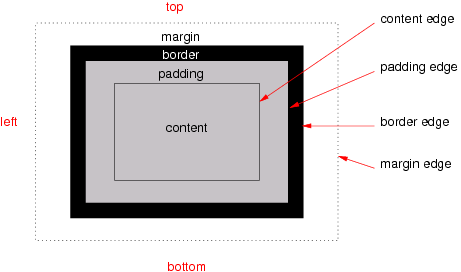
The CSS box model is nothing but the rectangular box wraps around every HTML elements. The model have four parts margin, border, padding, and content — work together to create a box that you can see on a page.
Block box in CSS have the:
Content box: The area where your content is displayed, which can be sized using properties like width and height.
Padding box: The padding goes around the content as white space; its size can be controlled using padding and related properties.
Border box: The border box wraps the content and any padding. Its size and style can be controlled using borders and related properties.
Margin box: The margin is the outermost layer, wrapping the content, padding, and border as a whitespace between this box and other elements. Its size can be controlled using margin and related properties. Let see how Box looks like,
What is a Block-level element?
Block-level elements by default start on a new line and occupy full page width.
Width and height properties are respected to block-level elements. Using display property, block-level elements can be converted to block-inline, inline, etc.
Few block-level elements are div, p, pre, h1,h2,ul,ol.
What is an inline element?
Inline elements by default occupy only the required width based on content size.
Width and height properties are not respected/applicable to inline elements.
Using display property, inline elements can be converted to block, block-inline, etc.
Some HTML elements, such as a, span, em,img, i and strong use inline as their outer display type by default.


